
Best AI Answer Generators for Students in 2026
Quick answer: ChatGPT is the most versatile all-rounder, AskMath is the strongest when you need answers and step-by-step explanations across subjects with image/PDF/voice input, and StudyX is the most thorough when you want verification and common-mistake feedback. Edubrain is the best genuinely-free unlimited option, and Gauth wins if you want a human tutor as backup. Six more tools, with real limits, are below.
If you are a K–12 or college student, the question is no longer whether to use an AI answer generator — it is which one. The top results for "best ai answer generator" are mostly tool pages from NoteGPT, SiteGPT, Summarizer, and Jotform, built for business users rather than students. The one ranking list (GetGenie's "7 Best AI Answer Generator Tools") puts its own product at #1 with no disclosed testing method, no screenshots, and no cons column.
This guide focuses on AI answer generators for students: tools that take a question you already have — a homework problem, a textbook screenshot, a chemistry question, a historical date — and return a real answer with an explanation. Not question generators, not pure math solvers, not general chatbots.
We hands-on tested 4 of the 8 tools (NoteGPT, AskMath, Edubrain, StudyX) using the same algebra question on the same day. This was a hands-on feature test, not a statistical accuracy benchmark: we compared each tool's answer flow, explanation format, verification features, and follow-up learning options on an identical question. For the other 4 we relied on public documentation and pricing pages — and where we could not test, we say so.
How We Evaluated These AI Answer Generators
Every tool was scored on the same 6 weighted dimensions, with the same weights for every tool, including our own.
| Dimension | What we looked for | Weight |
|---|---|---|
| Answer correctness | In our feature test, does it return the right answer to a standard homework question, rather than plausible-looking text? | 25% |
| Explanation quality | Are the steps clearly broken down? Do they show the reasoning, not just the final number? | 20% |
| Subject coverage | Does it handle multiple subjects (not just math), at a non-trivial level? | 15% |
| Image / PDF / voice input | Can a student upload a photo, a scanned worksheet, or speak the question? | 15% |
| Free access | Can a student get real help without paying — and what is the actual limit, not the marketing claim? | 15% |
| Ease of use | How fast from "I have a question" to "I have a clear answer"? | 10% |
Important honesty note: This is a qualitative hands-on feature test, not a statistical accuracy benchmark. We ran one identical question (algebra: Solve 2x² + 5x − 12 = 0 and show the steps) through each tested tool to compare its answer flow, explanation format, verification features, and follow-up learning options. The ratings are editorial comparative judgments based on that feature test plus each tool's official documentation — not accuracy percentages. Test date: 2026-08-20.
Quick Comparison Table
Pricing and free-tier limits were checked on each tool's public pricing page on 2026-08-20 and may change. "Tested" = we ran the identical algebra question through the tool ourselves (hands-on feature test); "Editorially assessed" = based on the tool's own documentation and pricing pages.
| # | Tool | Best for | Free? | Tested? |
|---|---|---|---|---|
| 1 | ChatGPT | All subjects, all-around | Yes (limited) | Editorially |
| 2 | AskMath | Answers + explanations across subjects with image/PDF/voice | Yes (daily credits) | Tested |
| 3 | StudyX | Step-by-step with verification & common-mistake feedback | Yes (20 credits/day) | Tested |
| 4 | Edubrain | Free unlimited, 70+ subjects | Yes (with ads) | Tested |
| 5 | Gauth | Photo-based homework, with human tutor backup | Yes (limited) | Editorially |
| 6 | Perplexity | Answers with citations and web sources | Yes (limited) | Editorially |
| 7 | NoteGPT | Free, no signup, text + image | Yes (20/day) | Tested |
| 8 | Brainly | Community-backed answers | Yes (limited) | Editorially |
Disclosure: AskMath (#2) is published by the same team writing this article. It is held to the same 6-dimension criteria, same test question, and same Limitations treatment as every other tool.
See how each tool handled the same algebra question in the detailed reviews below.
Detailed Reviews
#1: ChatGPT — Best All-Around AI Answer Generator
Best for: Any subject, any question type — a flexible general-purpose assistant you can also use for writing, coding, and tutoring.
Why it ranks here: ChatGPT handles the widest range of question types and its free tier is good enough for a lot of schoolwork.
Key features (per its public site and pricing page):
- Text, image, PDF, and file uploads; voice mode; web browsing (model-dependent, free tier included with limits)
- Long context window for reading chapters
- Custom GPTs for specific subjects
Limitations (based on public documentation and community reports):
- The free tier is rate-limited: heavy use is throttled to a smaller model once you hit the daily cap
- On hard math it can still produce confidently wrong answers — a real risk if you trust the output without checking
- Subject depth depends on the model; the free tier's flagship model is capped, while Plus keeps the full model with priority access
Pricing (checked on the official pricing page, 2026-08-20):
- Free: GPT-5.6 Luna with usage limits for the model and separate limits for tools such as file uploads, image generation, voice, and data analysis.
- Plus: $20/month with higher usage limits and broader access to advanced models and tools.
- Pro / Team / Enterprise: higher tiers
Not ideal if: you only need a free tool for occasional homework — the limits kick in faster than most people expect.
#2: AskMath — Best for Answers + Step-by-Step Explanations Across Subjects
Best for: Students who want a real explanation, not just an answer, and often work from photos, scanned PDFs, or typed-out textbook questions.
Why it ranks here: AskMath supports the most input formats of any tool we tested — text, image, camera, PDF, formula, drawing board, and voice — and is built around a learn, don't just get answers approach. The free tier needs no account, and the same question box routes to its AI Math Solver, AI Homework Helper, and AI Answer Generator depending on the input.
Key features (Tested on 2026-08-20):
- Multiple input methods: text, image, camera, PDF, formula, drawing board, plus voice
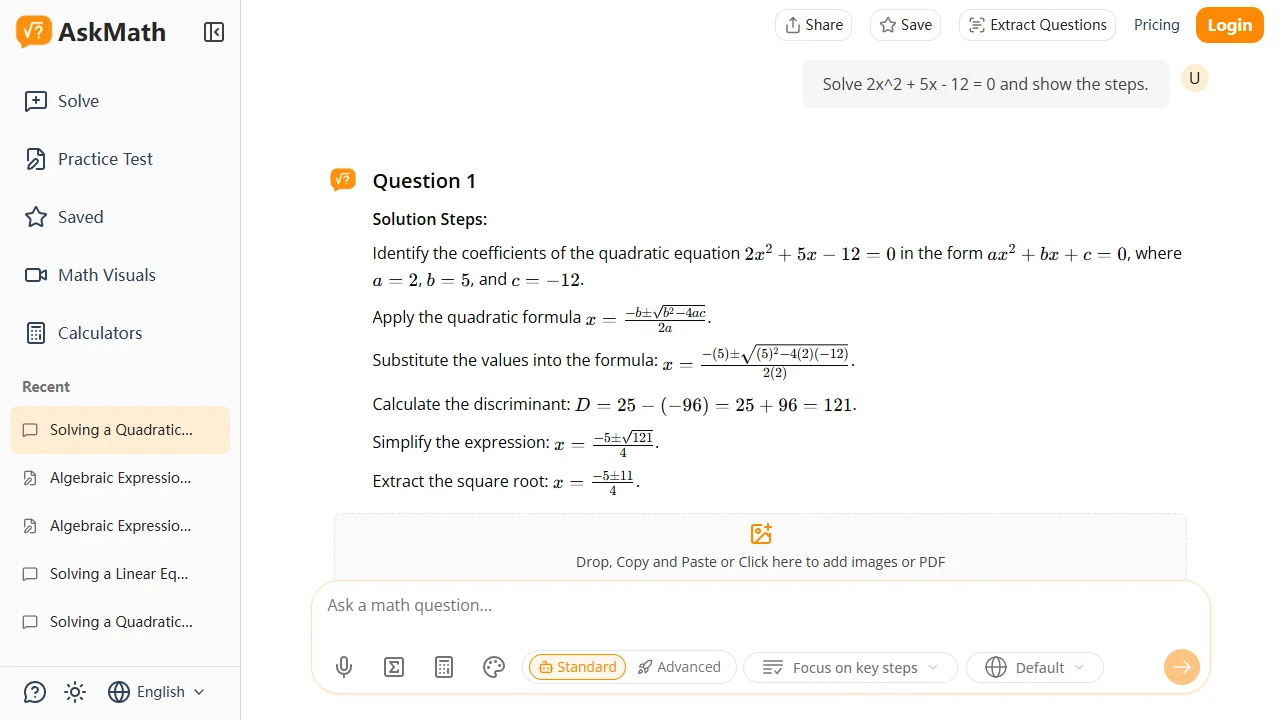
- Step-by-step solutions with reasoning at each step; automatic function graph for math
- Follow-up actions: Create Practice Question, Try another method, Watch related videos
- "Standard"/"Advanced" model toggle; "Focus on key steps" mode; 9 languages; history and saved questions
Limitations (Tested, with comparison to other tools):
- The free daily credit limit is not published on the homepage — you learn it by running out
- An optional Google login dialog appears after a few questions (dismissible)
- Multi-subject experience is centered on the AI Answer Generator page rather than the homepage
- No community-answers feature
Pricing (as of 2026-08-20, public pricing page):
- Free tier: limited daily credits, standard model
- Paid: more credits, advanced AI model, higher usage limits
Not ideal if: you need a community answer pool (use Brainly) or citation-backed answers (use Perplexity).
Tested output (same algebra question):
Final Answer: x = 3/2, x = −4 ✅ Steps via quadratic formula with discriminant D = 121; function graph rendered automatically.
#3: StudyX — Best for Verification & Common-Mistake Feedback
Best for: Students who learn best when they see not only the right path but the wrong paths and the reasoning behind them.
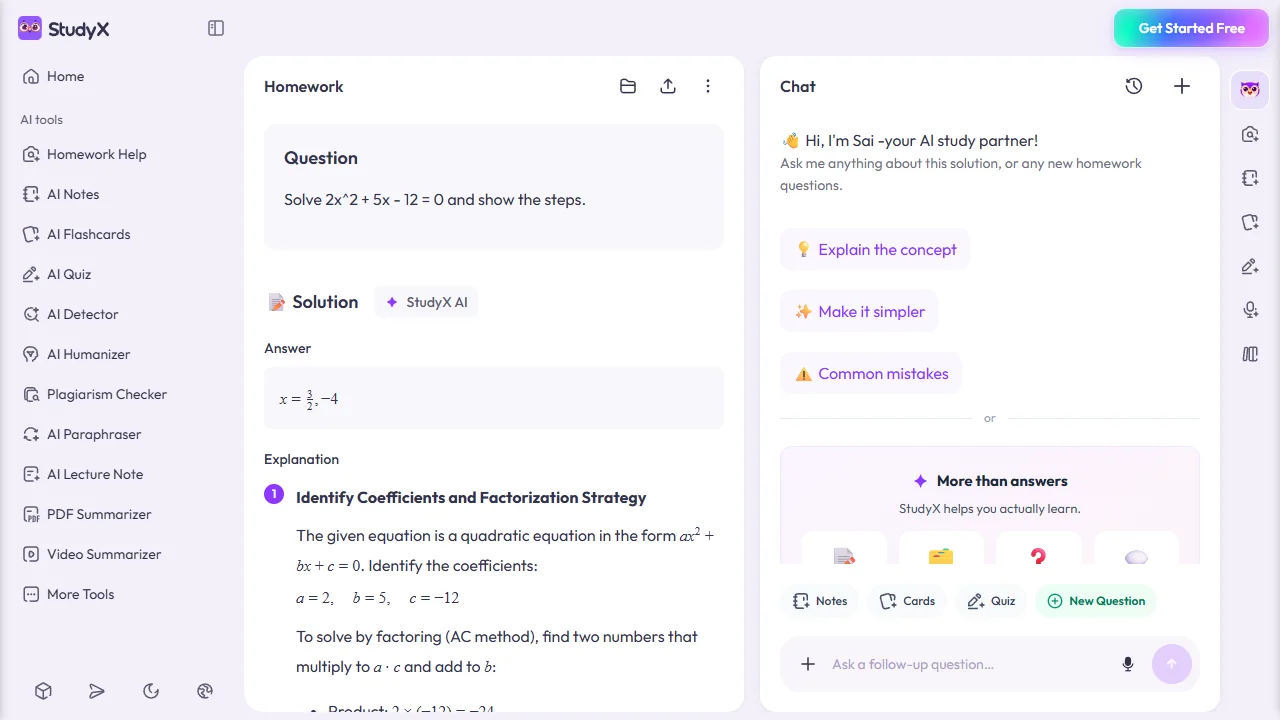
Why it ranks here: StudyX returned the most pedagogically detailed answer of the four tools we tested — four numbered steps, verification by substituting both roots back into the equation, plus Key Concepts and Common Mistakes panels.
Key features (Tested on 2026-08-20):
- Input: text, image, PDF, video, YouTube link, live recording
- "Verification & analysis" step; Key Concepts cards; Common Mistakes panel
- Related questions from a community pool (full access to the 75M+ community-verified database is a paid-plan benefit, per its official FAQ)
- AI study partner "Sai" with one-click templates: Explain the concept, Make it simpler, Common mistakes
- Trusted by 16M+ students worldwide (per its homepage, checked 2026-08-20); free tier, no sign-up
Limitations (Tested, with comparison to other tools):
- Slowest response of the four tested tools (~15 seconds)
- Community-related questions are other students' questions, not curated
- The 75M+ community-verified database and top AI models are gated behind paid plans; free tier runs on 20 credits per day
Pricing (per StudyX's official FAQ, checked 2026-08-20):
- Free: 20 credits per day; step-by-step help, chat with multiple models, 200M+ academic papers
- Plus / Pro / Unlimited: 3,000 / 10,000 / unlimited credits per month; unlocks 75M+ community answers, 24/7 subject-expert support, 30+ StudyX GPTs
Not ideal if: you need the fastest possible answer or want to avoid community-question noise.
Tested output (same algebra question):
Answer: x = 3/2, −4 ✅ Four steps with verification; Key Concepts and Common Mistakes cards; related questions from the community pool.
#4: Edubrain — Best Free Unlimited Multi-Subject Helper
Best for: Students who do not want to hit a daily limit and are okay with seeing ads in exchange for unlimited free use.
Why it ranks here: Edubrain is the only tool in this list whose free plan is explicitly unlimited (with ads). It has a 70+ subject selector and accepts text, image, PDF, and audio.
Key features (Tested on 2026-08-20):
- 70+ explicit subjects in a dropdown; free unlimited use with ads
- Step-by-step solutions with "Reasoning" notes; external learning resources linked (Khan Academy, Wolfram MathWorld)
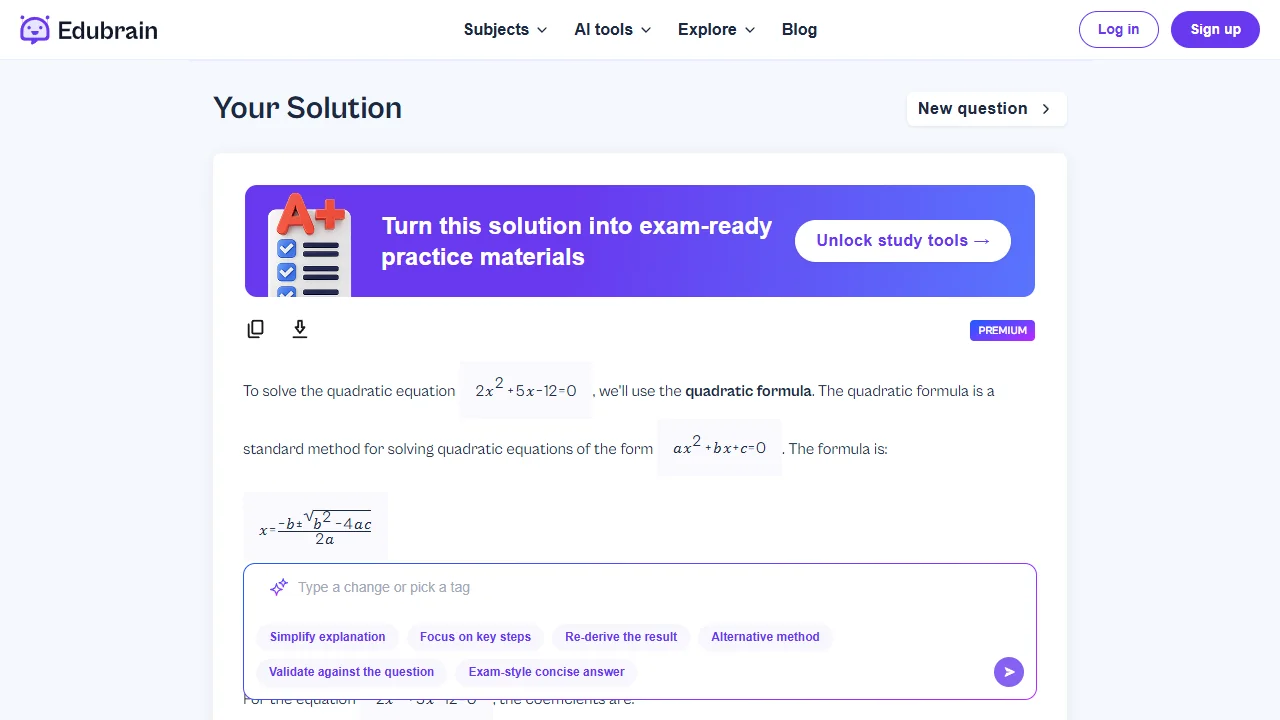
- 6 follow-up style tags: Simplify explanation, Focus on key steps, Re-derive the result, Alternative method, Validate against the question, Exam-style concise answer
- "Chat with Expert" link to a paid human tutor
- Two separate social-proof metrics on its homepage (checked 2026-08-20): Trustpilot 4.7/5 (3,997 reviews) and 224K+ students per month
Limitations (Tested, with comparison to other tools):
- Ads on the free plan
- No function graph or "try another method" option in the answer
- The interface is busy — AI detector, diagram generator, paraphraser, and humanizer sit in the same footer
- AI-Plus is weekly ($3.99), which adds up over a semester
Pricing (as of 2026-08-20, public pricing page):
- Free: $0/week, unlimited, with ads
- AI-Plus: $3.99/week, ad-free
- Expert help: from $3.99 per service
Not ideal if: you need graph visualization or a distraction-free interface.
Tested output (same algebra question):
Final Answer: x = 3/2 and x = −4 ✅ Steps via quadratic formula with reasoning comments; external resources listed.
#5: Gauth — Best for Photo-Based Homework with Human Tutor Backup
Best for: Students who want to point their phone at a printed problem and get help, with a human tutor as safety net.
Why it ranks here: Gauth is built around the camera. Its most distinctive feature, per its public site and third-party reviews, is the Expert backup — when the AI cannot solve a problem, a human tutor connects within minutes.
Key features (from public documentation and third-party reviews):
- Photo recognition for handwritten and printed problems
- Multi-subject: math, physics, chemistry, biology, economics, writing
- Step-by-step explanations with "why" framing; human tutor fallback (paid)
Limitations (not tested first-hand):
- Human tutor fallback is behind a paid plan ($11.99/month per public listings)
- Quality outside math and physics is reported as uneven
- The Web version is functional, but the iOS/Android app is the primary experience
Pricing (as of 2026-08-20, public listings):
- Free: limited daily questions
- Paid: $11.99/month for unlimited + human tutor
Not ideal if: you never photograph problems and prefer text or PDF input.
#6: Perplexity — Best for Answers with Citations and Web Sources
Best for: Research papers, citations, and any assignment that needs to defend where the information came from.
Why it ranks here: Perplexity is the strongest fit in this list when you need web-grounded answers with source citations. — an answer with a paper trail.
Key features (from public documentation):
- Web-grounded answers with cited sources; Pro Search for deeper synthesis
- File uploads on Pro; academic search filter
Limitations (not tested first-hand):
- It is a research assistant, not a step-by-step homework helper — no detailed worked solutions for math
- Source quality depends on the web; content-marketing pages can be cited with the same weight as a journal
- Free tier is fully functional, but Pro Search is rate-limited
Pricing (as of 2026-08-20, public pricing page):
- Free: unlimited basic search, rate-limited Pro Search
- Pro: $20/month with file uploads and longer answers
Not ideal if: you need worked-out math solutions.
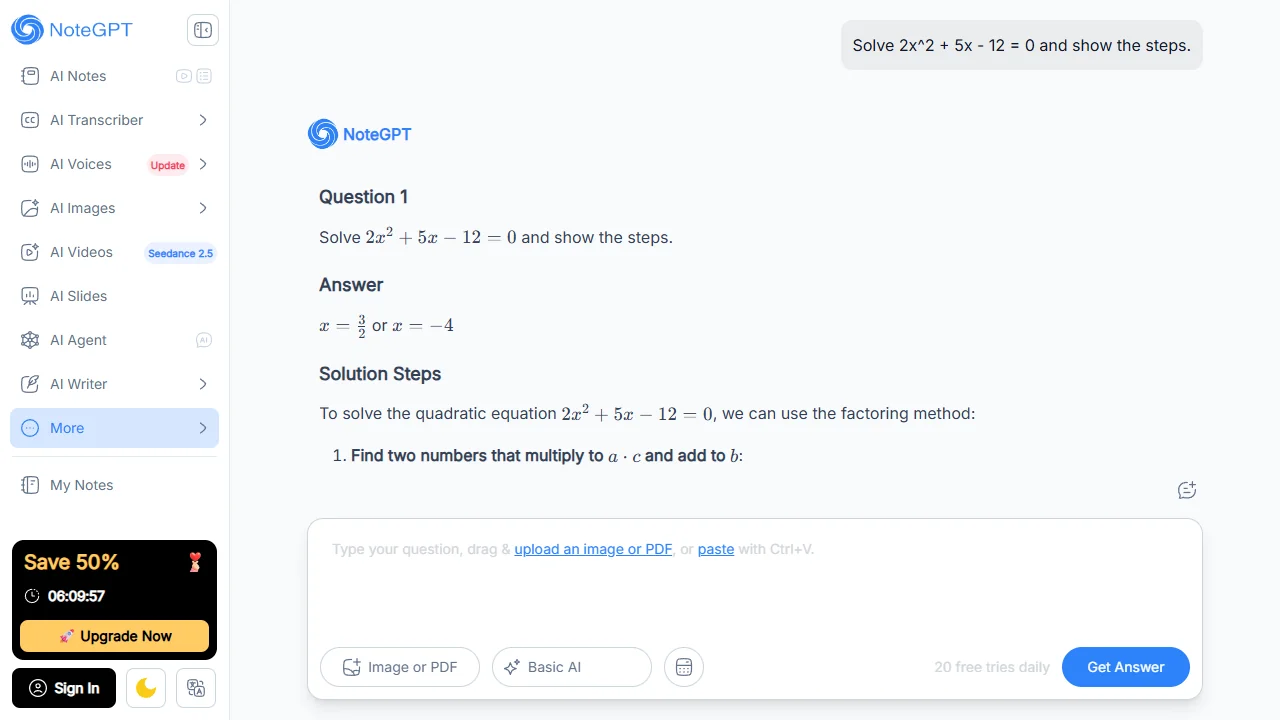
#7: NoteGPT AI Answer Generator — Best Free No-Signup Tool for Text + Image
Best for: Trying an AI answer generator without creating an account, a few questions per day.
Why it ranks here: NoteGPT sits at the top of the SERP for "best ai answer generator" and is the most frictionless of the dedicated answer-generator tools — no signup, 20 free tries per day, text and image input.
Key features (Tested on 2026-08-20):
- Free, no signup; 20 free tries per day (limit visible in the UI)
- Text input + image/PDF upload (drag-and-drop, Ctrl+V)
- Example chips: Math, Physics, Chemistry, Literature, Biology, History; LaTeX math rendering
Limitations (Tested, with comparison to other tools):
- Free daily cap (20)
- Default model is "Basic AI"; "Premium AI" pricing not visible without signup
- Sidebar is full of cross-sells (Quiz Generator, Flashcard Maker, Essay Writer, AI Detector) — feels like a landing page more than a focused tool
- No verification step in the answer
Pricing (as of 2026-08-20, public pricing page):
- Free: 20 tries per day
- Premium: not visible without signup
Not ideal if: you need daily heavy use — you will hit the 20/day limit by mid-afternoon.
Tested output (same algebra question):
Answer: x = 3/2 or x = −4 ✅ Method: factoring (8, −3) → split middle term → group → (2x − 3)(x + 4) = 0.
#8: Brainly — Best for Community-Backed Answers
Best for: Students who want to see how other students answered the same question, not just what an AI thinks.
Why it ranks here: Brainly is a community Q&A platform (350M+ answers) with an AI layer that summarizes and rephrases community answers. The underlying source is other people.
Key features (from public documentation and third-party reviews):
- 350M+ community answers across math, science, history, English, geography, arts
- AI summarizes the most-cited community answers; verified expert answers in some subjects; mobile app with photo upload
Limitations (not tested first-hand):
- AI answers are built on community answers, so quality varies
- Free tier has heavy feature limits; paid plans are more strictly gated than other tools here
- Subject depth is uneven — math and biology are strong; humanities vary
Pricing (as of 2026-08-20, public listings):
- Free: limited functionality with ads
- Brainly Plus / Expert: from ~$2.00/month on annual plans
Not ideal if: you want a clean AI answer with no community noise.
Head-to-Head Comparisons
AskMath vs StudyX
Both top the tested list; the right pick depends on what you need after the answer.
| AskMath | StudyX | |
|---|---|---|
| Answer + steps | ✅ | ✅ |
| Verification step | Via function graph | Explicit substitution |
| Multi-format input | Text, image, PDF, camera, voice, formula, drawing | Text, image, PDF, video, YouTube link, live recording |
| Common-mistake feedback | No dedicated panel | Yes — dedicated panel |
| Community questions | No | Yes — community pool (75M+ full access is paid) |
| Follow-up actions | Create Practice / Try another method / Watch video | AI study partner chat with templates |
Choose AskMath if you want the most input formats, follow-up practice, and a function graph for every math question. Choose StudyX if you want the explicit verification step and the Common Mistakes panel for every answer.
Perplexity vs ChatGPT
Both are general-purpose. Choose Perplexity if your assignment needs verifiable sources; choose ChatGPT if you need one tool for homework, writing, coding, and general tutoring.
Best Tool By Use Case
| Scenario | Recommended tool | Why |
|---|---|---|
| Math homework with verification | Wolfram Alpha (computation) + AskMath/StudyX (explanation) | Wolfram gives the exact answer; AskMath/StudyX show the work |
| Multi-subject homework with images/PDFs | AskMath, Edubrain, or StudyX | All accept image/PDF; AskMath also accepts voice and drawing |
| Research paper with citations | Perplexity | The only tool here that cites sources on every answer |
| Photo of a handwritten/printed problem | Gauth | Built around the camera, with human-tutor backup on the paid plan |
| Free unlimited multi-subject | Edubrain | Only tool with explicit unlimited free use (with ads) |
| Common-mistake feedback & concept cards | StudyX | Only tested tool with a dedicated Common Mistakes panel |
| Guided learning (don't give me the answer) | Khanmigo | Deliberately withholds answers; different intent — listed for completeness, not scored |
| Math-only with phone camera | Photomath (mobile app) | Mobile-only; no Web product, not in the main Web ranking |
On Khanmigo and Photomath: they appear under Use Case because students search for them, but they are not part of the main comparison — Khanmigo is a Socratic tutor (opposite intent), and Photomath is a mobile-only math app (no Web product). Not scored on the 6-dimension rubric.
FAQ
What is the best free AI answer generator?
Edubrain is the only tool in this list with explicitly unlimited free use (with ads). For no-signup, ad-free use with a daily cap, NoteGPT (20 tries/day) and AskMath (daily credits) are the best picks among the tools we tested.
Are AI answer generators reliable for homework?
For well-formed questions with a single correct answer, AI answer generators are often useful and can be highly accurate, but they can still make mistakes. For open-ended or interpretive questions, the answer is a starting point, not a final submission — every tool here can produce a confidently wrong answer, so verify important results.
Is there a difference between an "AI answer generator" and an "AI question generator"?
Yes. An answer generator takes a question you have and gives you an answer (this entire list). A question generator takes a topic and produces questions for you to practice — see the AI Question Generator page. Different tools, different jobs.
How is this list different from a "best AI math solver" list?
A math-solver list compares how well tools solve math. This list compares how well tools answer a question and explain it across subjects — math is one of the tested subjects, but the same tools also handle science, history, and language homework.
Can I use an AI answer generator on a photo of a worksheet?
Yes. AskMath, StudyX, Gauth, Edubrain, Brainly, and Perplexity (on Pro) accept photo or image input; Gauth is built specifically around this workflow.
Are there risks to using an AI answer generator for schoolwork?
Three, all true across the category: hallucinated answers (every tool can produce a wrong answer that looks right — verify), academic-integrity policy (use tools to understand, then write the answer in your own words), and free-tier limits (most tools have one; only Edubrain, with ads, is unlimited).
Conclusion
The best AI answer generator in 2026 depends on what kind of question you usually have. ChatGPT is the safe all-rounder. AskMath is the strongest when you want a real explanation with the most input formats. StudyX is the most pedagogically thorough. Edubrain is the best unlimited free option if you don't mind ads.. Gauth is the pick for photo-based homework. Perplexity is the only one with citations. NoteGPT is the most frictionless no-signup option. Brainly is the community-backed answer.
The honest common thread: they are starting points, not finish lines. Verify important results, follow your school's AI policy, and use them to understand — not just to copy.
For a quick start without signing up, try it for free — the AskMath AI Answer Generator supports text, image, PDF, voice, and drawing input across math, science, history, and literature. For broader homework workflows (quizzes, practice-generator questions, and step-by-step math walkthroughs), the AI Homework Helper is the related product on the same site.
Reviewed by: AskMath Research Team Last updated: 2026-08-21 Disclosure: This article is published by AskMath. AskMath is included in the comparison under the same 6-dimension rubric used for every other tool. Affiliate links are not used. Pricing and free-tier limits were verified on each tool's public pricing page on 2026-08-20 and may change.